
In order for you to be able to make conversations work for your blog, you need to be updated whenever a new comment has been posted on your blog. While it would be good to respond to comments as and when you see them, nothing really beats the ability to respond to comments immediately!
I’m still amazed how Liz does it everyday, but I think I will want to share some techniques and nifty tools you can use to make conversational commenting work for your blog.
First of all, you need to make sure that you don’t REQUIRE moderation of every comment on your blog. You should let people’s comments appear immediately but you MUST install a spam filter.
1. Don’t Require Comment Moderation
Lorelle once shared her thoughts about comments waiting for approval. While her concerns in the post are more about informing the reader that the comments are sent for moderation, I think what is worse is that it cuts of any possible dialogue between different two readers – until you are back on your computer and your comment is approved.
To elaborate on this with an example, lets just say you post a new blog entry, and you have two readers who are reading your blog (John and Mary, for example). John finds your content interesting, and posts a comment, and the comment is sent for moderation. At this time, Mary is not able to see John’s comments (and reply to John), even though they may both be online at the same time. This can be a wonderful dialogue that has been cut off because of forced comment moderation.
So its important NOT to require comment moderation for every comment, and here’s how you do it in WordPress:
Head on to your WordPress Admin Console -> Options -> Discussion. Here are the settings you should have.
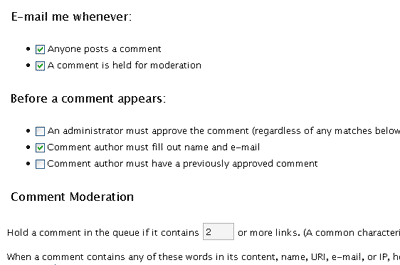
Notice that I have set WordPress to email me whenever I receive a new comment, or when a comment is in moderation, and also to keep a comment in moderation when there are two or more links from the comment.
The reason behind moderating comments with two or more links is that a common characteristic of spam comments is a large number of links. I will elaborate on the emailing option later.
That said, it the next step is to make sure spam comments don’t get through.
2. Handling Spam
I understand the primary concern behind comment moderation is spam comments. Yeah I get loads of them too! Its really irritating, but lets all take it on the bright side – the amount of spam you get everyday is proportionate to how popular your site is, isn’t it?  Anyway, to tackle that issue, simply install a comment spam filter. WordPress ships out with Askimet in its plugins, so just go ahead and get it activated.
To do so, just head on to your WordPress Admin console, under the menu “Plugins”
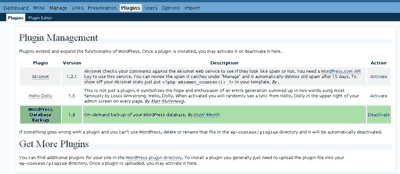
Find Askimet in the list, and hit “Activate” on the right. After that you will find a new submenu under plugins, called “Askimet Configuration”.
To fully activate Askimet for personal use, you need a API key. You can get a free API key by registering for a WordPress.com user account.
So far, Askimet has worked wonders for me.
3. Receiving Email Notifications for Comments
The next step towards conversation is for you to receive email notifications for comments on your blog. Why is this important? Because you can set your email account to check for new mails automatically every 5 minutes. This saves you the task of having to refresh your browser to check for comments.
Some people will also comment on your older posts, so its quite impossible to track your comments if you do not have email notifications set.
For WordPress users, this is done on the same page as comment moderation. (WordPress Admin Console -> Options -> Discussion)
4. Allow your readers to subscribe to your comments
Now that you can keep updated with your comments, the next step is to make sure your readers can do the same! There are two ways to do it – by RSS and by email, and I’d really recommend the email option. But I’ll explain both.
RSS – by default, WordPress creates a RSS feed for the comments for each and every single post that you make! This is available using the comments_rss_link() command. Check out the documentation for the command at the WordPress Codex.
Email – in order to enable to email subscriptions for comments, you need to install a plugin (well, you don’t need to, but I guess that is the best way to do so :mrgreen:) The plugin to use is Subscribe To Comments. Installing the plugin can be quite technical, you need touch some HTML and PHP code, so do get someone who knows this stuff to guide you if you are not confident.
As mentioned, I would very much recommend the email option, because I guess nobody will really bother adding a new feed in their feed reader for every post you make! Besides, RSS technology is not very widely used and requires explanation for the less Internet savvy.
With Subscribe to Comments, the user can choose to receive updates on new comments on that post, and can also unsubscribe from the service as and when he or she wants to. Wonderful plugin you must use.
5. Immediate Notification using Firefox, Gmail and Gmail Manager
This tip might not be useful for some people, but here’s what I do to get almost instantaneous notifications for comments.
Firstly, I register my WordPress setup using a Gmail account. This account will be the one that is notified when there are new comments.
Secondly, I use Firefox web browser with the Gmail Manager plugin. What the Gmail manager plugin allows you to do, is to access your Gmail account with literally one click, and more importantly, it allows you to periodically set it to check your Gmail account and notify you of new mail.
So all you have to do is to keep your browser open. I personally set it to check at 5 minute intervals, lowering it to 2 minutes when I know the other person is online at the same time as me!
Of course, as mentioned, this might not be applicable to everybody, because you might have your regular email client to check mails at that interval too. Popular email clients like Outlook and Outlook Express do allow you do to that.
With these settings in place, your blog is set for conversational style comments! Whenever someone comments on your blog, you get an popup within 5 minutes telling you about your new comment, and you respond. If your subscriber is subscribed to your comments, he or she will get an email when you comment.. and this just goes on and on and on, back and forth… and there you go – your conversation comment thread!
Are there any other tools that you use that would be wonderful for conversational style commenting? I think there should be a plugin out there for AJAX commenting, with real time updates… although I haven’t seen any in action. Anybody care to share?
Thanks for the link and I’d also like to recommend How NOT to Comment on Comments, a guide on comment making that has been really helpful to many for continuing the conversation online.
Excellent point. I’m thrilled, too, that you address the issue of comment spam. It’s really hard to enjoy the conversation, and have any respect for a blog, when the conversation is filled with nasty comment spams.
I do, however, take issue with the point of email subscriptions to comments. Many, including yourself, place the notification for email subscription under the “Say it!” or “Submit” button, which people rarely scroll down to see, until after they’ve hit the button. I recommend to everyone that they put that check box above the comment so it is easily seen, kill the “note to comment users about what HTML they can use (we all kinda know by now), moving the privacy issue to the email form section, and NEVER forcing the notification box to be checked.
I get hundreds and hundreds of emails, spam and otherwise, every day. The last thing I want is more email from every blog I comment on. I spend a ton of time clicking links and unsubscribing from blogs which forced me to sign up when I did not want to. It doesn’t make me feel very good about the blog as the blogger just added more work to my life. Make it an option and a choice and make it clear, above the Submit button. If I want to subscribe, let it be my decision.
Thanks Lorelle, for your insights! They are certainly useful and I’ll get mine changed right away!
Actually, after consideration, I think it is still important that I put down my blog comment policy, what is done to the email addresses and details and stuff like that, but perhaps elaborate it on another page, rather than stuff everything under the post.
There are definitely less Internet savvy users who would need this information.
What do you think?
I like how you changed things. Much improved. I think it’s important to allow people to subscribe if they want to, but not to force it upon people. And a comment policy is essential to all who live for the thrill of comments on their blogs.
Fabulous and helpful article. Thanks for making these points and tips. They are a great help for so many!
Thanks Lorelle. I’m flattered, I’m just doing my best to contribute good content to the blogosphere and help fellow bloggers succeed 😉
Kian Ann – great post
Lorelle – great suggestion on the placement of the check box; looks like I have to make some updates to my blog
Qustion – Do any of you get people posting comments that have nothing to do with the context of your post? I’ve posted about industry contest and had people come across the blog and try to answer put an answer in the comment section vs. the site that has the contest I’m writing about.
Well yes, in a sense sometimes the conversation in the comment can stray away from the main topic.
In your case, maybe you could redirect them to your contest site?
Pingback: Legal Andrew » How Do You Deal With Negative Blog Comments?
Pingback: The big fuss about comment moderation
Pingback: Blogtipping - Three Great Blogs, and a Tip for Each « Legal Andrew
Pingback: 10 Quick Methods to Increase Blog Comments « Legal Andrew
Thanks for a very thought-provoking post, Kian Ann. I might have to make the leap and strip moderation from my blog…soon. I don’t think I’m quite there yet. Although, I guess it could be tried for a while and if it doesn’t suit needs it could be put back.
Question: Could you please explain how to move the “subscribe to this comment” checkbox. I open up my comments.php and I am faced with a lot of code I am unfamiliar with. Which section can I cut and paste, and where do I insert it?
Thank you.
Hey Rory,
At the place where you want the checkbox to be, put in this <?php show_subscription_checkbox(); ?>
I’ll drop you a mail with my comments.php, so you can refer to it, would that be good?
That would be extremely helpful. I do have the Subscribe To Comments plug-in, but I can’t for the life of me see the piece of code relating to it in my .php file. I certainly don’t have a strip of code that reads
Heya Rory,
I have emailed you the file 🙂 Good luck! 🙂
Pingback: å´æ™ºå‹‡çš„åšå®¢ | å¿«é€Ÿå¢žåŠ è¯„è®ºçš„10个方法
Nice article, sometimes people fail to write about the little practical things people can do to make their little world on the web nicer. Well written and well thought out, thanks.