
I was encountering some difficulties installing WordPress MU 1.0 using different subdomains, and I finally figured it out after some time, so I thought I’d do a walkthough to help fellow MU-wannabes. 🙂
I think its important, first to understand that different web hosts use different admin control panel systems, and mine is using CPanel/WHM. I have a reseller account, so I have access to the WHM console.
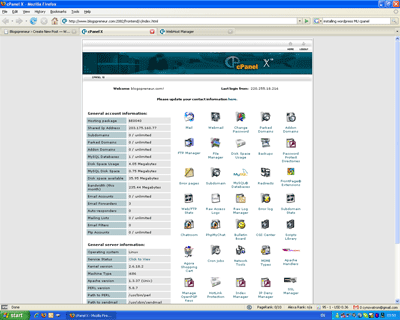
To triple confirm, your webhost admin should look something similiar to this:
and your WHM, if you are a reseller, should look like this:
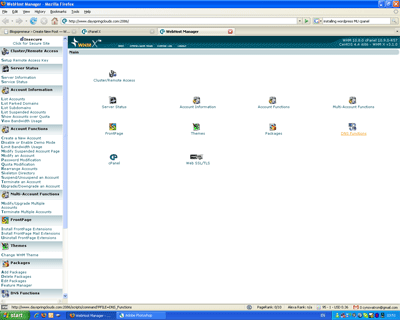
Actually, on a second thought – it may not, because this is one of the skins… but just make sure you are using CPanel/WHM if you want to follow through with this walkthrough.
What are we going to achieve here?
At the end of the whole thing, you will install WordPress MU 1.0 on your server, using a different subdomain for each blog. So for example, if your domain is bloggingiscool.com, then you will be able to quickly create blogs like http://firstblog.bloggingiscool.com, http://secondblog.bloggingiscool.com… and so on.
In this installation, you will also be installing it in the root directory of your server (i.e. public_html), so http://bloggingiscool.com will be your main MU blog. You can choose to install it in a subdirectory, such that http://bloggingiscool.com/blogs as your main MU blog, but again I will cover only the first one. Go figure (duh, just dump the code one level deeper!), if you want to install it in a subdirectory.
Note that WordPress MU also offers another alternative, that is to install each blog in a different subdirectory. I will not be covering that here.
Lets get started.
Step 1. Download WordPress MU and extract the files
The first step, is of course for you to head down to the WordPress MU download page, and grab a copy of the source code. It should be a zip or tar.gz file. Doesn’t matter.
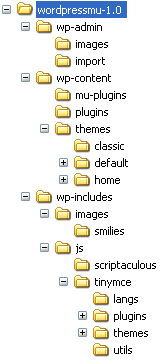
Unzip the file. You will get a directory like this:
Step 2. Upload Those Files!
Now, WordPress freaks out there, DON’T be tempted to go and edit the wp-config-sample.php! What you need to do now is to just upload the whole thing into your webserver!
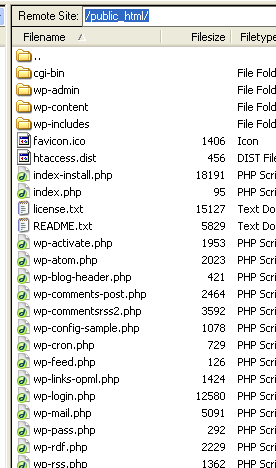
So, the files in your public_html folder in your web server will look like this (treat the wordpressmu-1.0 folder like your public_html folder)
Step 3. Change File Permissions
Head on to your domain. i.e open your browser and head on to http://www.{your-domain}.com
You may get this message, or a few different others. Just follow the instructions and to the CHMOD to your files.
Also make sure that you have Apache’s mod_rewrite module enabled for your server. If you have been using WordPress on your server with custom permalinks, then you are fine. If you are unsure, do check with your server admin.
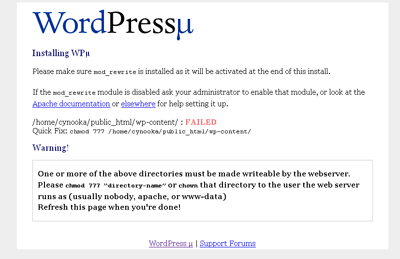
When you are done with the permissions setting, you should get this.
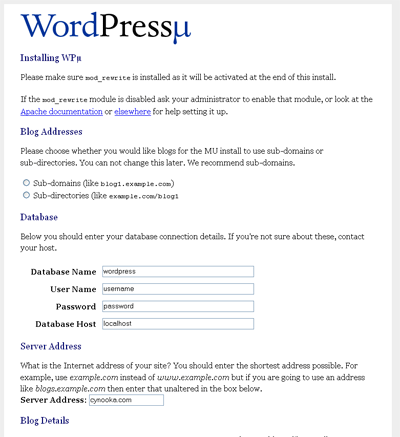
Hold on a minute, don’t enter the details first.
Step 4. Set up your mySQL database
Now its time to log on to your CPanel and create your mySQL database and user. For this example, lets say your mySQL username is blogcool_user, password is bloggingisverycool and database name is blogcool_wpmu.
Step 5. Enter the details
Select “subdomains” in the Blog Addresses section, enter your mySQL credentials into the page, and the details of your main blog.
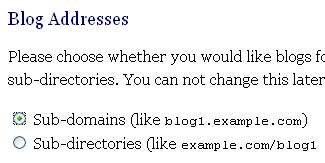
Hit submit and you will grin like me  seeing that you are done!
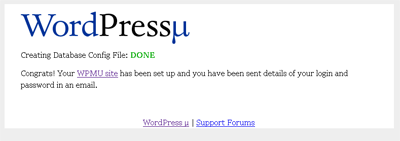
Your login credentials are sent to the email address specified.
Don’t be too happy yet. You are only halfway done!
Yeah. The show has just begun. WordPress MU is installed, fair enough, but configuration for your subdomains will NOT work! You can go ahead and create the blogs, but you WON’T be able to access your blogs using the subdomains like http://firstblog.bloggingiscool.com
So, next, you need to configure your server!
For those who do not have reseller accounts, you might just need to ring your server admin up to get this part done for you. For those with reseller accounts, you still need to contact your server admin. The only time you do not need to contact your server admin is when you have the rights to access your server’s httpd.conf file.
Well. I didn’t. That’s why I was stuck~! 😀
Step 6: Configure your wildcard DNS and sub domains (sounds geeky)
Yes, a subdomain with an astericks.
I’ll do some screenshots when I do find the time to do so! Meanwhile, pardon me! 🙂
Read more about this step at this comment.
If you read the readme, it recommends you to Matt’s blog where he explains how to do so. But to me, it didn’t really help, because he was giving me a bunch of code – I had a graphical web interface for my reseller admin console.
Anyway, here’s what you need to do.
Log in to your WHM account. On the left, find and click “Edit DNS Zone”.
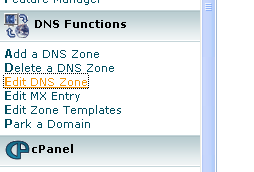
Your accounts appear on the right. Select the domain you use for your WPMU installation, and click “Edit”
You will see a bunch of text boxes and a bunch of numbers!
Whoa! What is this? To be frank, I don’t know much either, but what I know is that messing with these number is no fun (because I’ve messed up with them before, and caused some trouble for the server admin :mrgreen:)… but I know what to do now.
You will see something like this. (erm.. minus the red arrows. Those are my drawings. Nice? :))
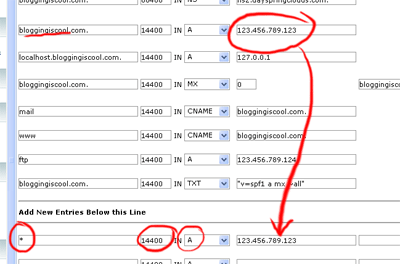
Create a new entry after “Add New Entries Below this Line”.
You should specify * for domain, 14400 for TTL (default value), A for record type, and your server IP address. To find out what IP you should type, refer to the record with your domain above.
Click save.
Go ahead and retrieve the same page again (i.e. Edit DNS Zone -> Select Your Account). You should see the new entry there.
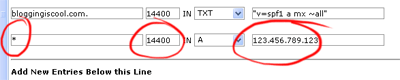
If that is the case, you are done with WHM. *phew*
BUT you are not totally done yet!
Step 7: Erm… part 2 of step 6? I promise this is the last part!
You need to add something to your httpd.conf file.
I personally do not have the opportunity to do so, so I had to mail my friendly server admin to do it.
Here is what you need to add:
<VirtualHost {SERVER_IP_ADDRESS}>
DocumentRoot /home/{CPANEL_USERNAME}/public_html
BytesLog domlogs/{YOUR_DOMAIN}-bytes_log
User {CPANEL_USERNAME}
Group {CPANEL_USERNAME}
ServerAlias {YOUR_DOMAIN} *.{YOUR_DOMAIN}
ServerName www.{YOUR_DOMAIN}
CustomLog domlogs/{YOUR_DOMAIN} combined
</VirtualHost>
Where:
- {SERVER_IP_ADDRESS} is your server IP address
- {CPANEL_USERNAME} is your CPanel username. Normally this should be eight characters or less. This is the username you use to log into your CPanel console for your account
- {YOUR_DOMAIN} refers to your domain, e.g. bloggingiscool.com
So, giving an example, where my IP is 123.456.789.123, CPanel username is blogcool and domain is bloggingiscool.com, the code is like this:
<VirtualHost 123.456.789.123>

DocumentRoot /home/blogcool/public_html

BytesLog domlogs/bloggingiscool.com-bytes_log

User blogcool

Group blogcool

ServerAlias bloggingiscool.com *.bloggingiscool.com

ServerName www.bloggingiscool.com

CustomLog domlogs/bloggingiscool.com combined

</VirtualHost>
Again, you (or your server admin) need to add this to your httpd.conf file, and according to Matt, this entry must come after any valid subdomain VirtualHost entries you may have. So if you already have another subdomain on that same account, then make sure this entry come after the subdomain’s entry.
Then you are really finally done!
You can login now and start whipping out blogs. Remember your password is sent to the email address you specified.
So.. installing WordPress MU is not as easy as the walk in the park right? At least not for me! But just imagine what you could do when you know you can create blogs on the fly, on your own domain! 😉
Give me more time to fiddle with WPMU, and I’ll tell you more.
Oh… If anyone with access to a httpd.conf could provide details on the part to add the VirtualHost record, then it’ll be wonderful!
Great Job!
Your detailed description will save me lots of time experimenting with the DNS settings and possibly screwing up the servers.
I will try to install WordPress MU on a GoDaddy hosting account and see which options it allows. GoDaddy doesn’t use CPanel and I think it’ll be a real challenge to get their support people to do all those http.conf stuff!
Let’s see.
I haven’t had the opportunity to use GoDaddy’s hosting. Maybe I should try one day to check out the server admin system. Heh. 😉
Hosayliaolah!
I got WordPress MU working on GoDaddy shared hosting without asking the support to change anything. It just work beautifully out-of-the-box! This is how what I did.
1. Log in to the hosting control and editing the DNS. Just at the asterisk and the IP to the server.
2. Set up the MySQl database.
3. Upload the WordPress MU files. NO NEED to edit any configuration.
4. Enter the url to the domain you’ve uploaded the files and enter appropriate values.
5. Hit submit. Wait for email confirmation. Get password to log in. So simple.
The people that created WordPress MU are really fantastic!
Now I have 100G space and 1000G transfer to blog until drop!
Congratulations!
Now you can offer blogging solutions to your workshop participants! 🙂
Hello, finally some easy instructions!
Two questions though:
1: in step 5 where it asks me the domain (“example.com”) do I have to put mydomain.com OR “subdomain.mydomain.com” ?
2: in the case I want to use subdirectory, do i have to set something in whm or httpd.conf ?
Thank you.
Simon
Hi Simon,
If you want to have blogs like “blog1.yourdomain.com”, “blog2.yourdomain.com”… just enter “yourdomain.com” in step 5.
Yeah, if you use subdirectory, there is no need to amend the httpd.conf or WHM at all, just install (i.e finish step 5 and you are done :P)
Hope that helps!
Great explanation thanks. I am stuck at receiving the initial admin password via email. I have tried different addresses and I am 100% it is not a spam issue. Any ideas?
I wound up changing the password in the database itself but I’d like to get the email up and running.
Hey Reversearp,
Frankly, I don’t know why it happens this way, but what I can advise is to try sending a mail to yourself from your blog’s domain.
I will drop you a mail with the script.. just upload it and just visit the page. See if it works first, that’ll isolate the problem. 😉
Hey Reversearp,
I think I will post the script here instead, for future reference…
1. Open notepad
2. Copy and paste the following:
<?php mail("you@yourdomain.com", "test subject", "this is the test message" ?>Remember to change you@yourdomain.com to your own email address.
3. Save it as testemail.php
4. Upload it to your server
5. Load the page in your browser
You should get an email. Let me know the results, so we can troubleshoot further. 😉
Hi everyone,
I just install WPMU today too. Everything seems to work fine…just the same problem -> No email send out!
Ok, I received the admin email and password. Then I test out to try register a testing blog and waited for the email for 5hours+, but there is no email being send out !
At first I thought it is something wrong with server, so I use another domain to send+receive email, it works! Server is working fine, mail server is ok !
I search thru MU site at wordpress, and it seems that there are other people also facing the same issue, but there doesn’t seems to be a good solution.
Anyone has been able to overcome this error??
Whoa… sounds like a serious issue if many people are facing the same issue.
Are you guys using your own domain email address? Try that too.
My guess is that someone must have been doing something nasty with WordPress MU today (or the past few days)? I’m really not too sure.
Hi Kian Ann,
yes, I installed wpmu in root domain, and the email address is also a root domain. I test again to send + receive email for this email address using outlook client, it is functioning ! I can send a test email to my yahoo email, and also receive email from my yahoo account too.
…just that there is no activation email sent from WPMU !!
I just tested this :-
and it didn’t work..no email send/received 🙁
( I did change to my admin email )
My project is stuck 🙁
any kind soul kind to share a workable solution??
Hey there James. Was your issue resolved yet? My apologies I am as dumbfounded as you on this problem. I’ve also attempted searching the Codex for answers but to no avail. Do let me know ya! 🙂
Hi Kian Ann 🙂
Apparently it is caused by the permission setting for “public_html” folder. It should be set to 777 ( which is needed for the installation to run thru ).
The error of email not being able to be sent out was caused by the permission setting for public_html folder which I changed back it to 750 after installatin was successful. 😛
emm…wpmu is pretty complicated in the sense that it is using only 1 database to manage and store all user blogs. Some plugins that worked in WP blog is not compatible in wpmu version…this is getting me great headache ! 🙁
I was toying with some plugins and activated in user/test account…and the whole site just went blank ! yes…just a Blank Page when it load, inclusive the main site ! I had to delete off the plugins via FTP to bring the site back. This is no good! Without those great plugins, users will not be much happier 🙁
In the meantime, I am still digging more into how to develop/customize the WP plugins to make them compatible in WPMU version. The problem is…I am not a programmer 🙁 I didn’t study computing or programming during school time 🙁
emm…
James…more headache !
Thanks for the update James. For myself, I still can’t find the time to play with WPMU as much as I want to… need to secure my ricebowl first 😛
I’m sure there will be further development in WPMU support – with all the wiget-ty things going on. i don’t like widgets, I like control.. but that’s not what people like generally. 🙂
Halo Kian Ann !:)
Oppss…I thought you are running your own biz venture?? So you are your own boss, still gotta worry about rice bowl ??:P
I have spend too much time (nearly 1week) toying with WPMU but too much headache for myself 🙁 . I guess it’s time to move on and navigate another blogging platform !
Oh well, time is too precious for us who live in little red dot land right?? Yup, we are from same land 😛 I jst found out after browsing thru your other site.
Thumb up for entreprenuer like you 🙂
Wah okay! Good… now can talk Singlish! haha! I’m in the “still struggling” stage lar, so thumbs up for me only when I succeed ya!
Anyway, so far WPMU has been the only free system I see that let you set up multiple blogs on your server, and after these months, I think WP is one of the more commonly used platforms out there 🙂
Pingback: How do i create additional blogs on wordpress - Page 2 - Easy Wordpress Forum
Pingback: Stop, Start and Continue: What will you do in 2007?
Can someone help me? I am a senior in high school and helping to run a non-profit newspaper organization. The previous editor who set-up WP on the root directory left the team and I do not want to screw it up. That is why I need help installing WPMU on a subdirectory and linking them to blogs such as blog.mydomain.com (top level domain)
I think I have setup MU successfully but when I create a new blog, the addy does not work.
The paper a non-profit high school newspaper and are not looking to seek revenue on this project. Just some help
Hi Sawhney89,
The reason (probably) why the addresses did not work is because the wildcard DNS settings are not set. Have you set up the wildcard DNS settings yet?
According to ASO help — they said they did it. Is there a way to check?
Do you think you could help me out? The original editor left and since they think I am a “techie,†I have been left to the project and I am at the point of desperate.
According to the WP forums there is a way to edit the file to make blog addresses on the top level domain even when you install it on a subdomain. I just do not want to mess up my existing WP on the root – it is the core of our newspaper.
I am willing to pay a little bit of money and give you access information. I just really need some help. I apologize for my attitude and appreciate any help I can receive.
Hi Sawhney89,
I’d love to help, but it would not be this week – really kinda busy this week. What about mid week next week?
I am also not very familiar with the kind of installation of WPMU that you need to do, so I will need time to research too.
Hi Sawhney89,
well…is your site totally new or already have some data ??
For your info, I run free hosting service, and doing my some little part for educational site too . Meaning, free hosting for educational site. And I can help to set up the WPMU for you.
The main help from you is to point your domain to my server, ad I can setup an account for your with WPMU ready.
You can sent more information on how you want it to my admin email address at vbloge dot com
James
PS :- for general info on my free hosting service , visit one of my other site at http://juztalk.com
Thanks James, it would be great if you could help Sawhney89… however, I think he already has a WP installation on his site, and he wants an MU installation over his current one.
Any idea how to get it done?
Hi Kian Ann,
emmm…that could be conflict if he already has WP installation on his site, right ?! coz standard WP is just for single user, and WPMU would be using the database for all users.
If he want the WPMU to have user1.site(dot)com, and so on, the I believe he’ll need to have the WPMU install into the root domain. And this mean over-riding exiting standard WP installation ( if he install his WP in the root domain ).
emm, what’s his site anyway?? Let’s see if he is willing to let go his current WP installation and over-ride it with WPMU, and then start afresh ??
Of course there could be another option of moving the current WP to a sub-folder, but I didn’t try this way before. Not sure how would it become .
James
Hey James,
I’ll drop him a mail so that we can work it out yah… Unfortunately I do not know much of the details too.
I have WP set-up on the root. However, the editor who setup WP left and consequently I am left with the site and minimal knowledge. I do not want to override the root WP because it is the core of the website. I currently have WPMU setup on my domain and just waiting for the DNS to get updated.
Right now when I create a blog it is http://www.blog.subdomain.domain.com According to the WP forums, there is a way to edit the PHP file and make the blog: blog.domain.com while it is installed on the sub domain and will not affect the root WP.
Hi Sawhney89,
emm…I didn’t this option before that having WPMU on sub-domain + users account in sub-domain too, while leaving the standard WP in root domain.
Maybe you could help point me to the WP forum that at least give some guides on how to do it, and let me study it.
I have my own server with root access, and could setup wildcat for your domain on my server.
Or since you already had both the WP + WPMU installed, wouldn’t it solved your problems already ??! ( if I read it right )
James
My problems are semi-solved. I just need help installing a few plug-ins and reverts the domain addresses from blog.subdomain.domain.com to blog.domain.com while keeping the root WP intact.
WP Forum: http://mu.wordpress.org/forums/topic.php?id=3154
Hi Sawhney,
emmm..glad to hear that it’s half way solved. 😀
Ok, just to note that not all plugins are compatible with WPMU version.
I look thru the support forum :-
“install the primary blog on a subdomain, and then hack the registration code/functions to set the primary domain as domain.com vice username.sub.domain.com.”
emm…it requires some coding/hack which I am too poor in. In most case, I just install ready made script without much modifications. My apology for not being able to help solve your coding/hack problem.
My thought was you need help to install WPMU, sorry I didn’t read it right in the first instance.
James
Do you know anyone who could assist me?
James
Do you think you could help me install a few plug-ins and hacks for WPMU?
Hi Sawhney,
well, actually it is very simple to “install” plugin for WPMU, which is similiar to installing plugin for standard WP. Just upload those files into the correct folder(s), and then “click” to activate it in your admin section, which is just like standard WP plugin.
Just to note, not all WP plugins are compatible in WPMU version.
Nevertheless, if you are still facing problem in trying to install whatever files/scripts that you need ( and in future too ), you can actually ask your host to do it for you too. That’s the beauty of being a “client/customer” isn’t it ?! 🙂
This would be the safer option instead of releasing your access info to some other people like me, just for pre-caution. Well, better be safe than sorry 😛
No worry about “what if” your host don’t help. You’ll be surprise as to how helpful your host could actually be! If they don’t do it for you for some reasons, they are likely to give you some guides/info as to how to do it at your end. This way, you could actually pick up the knowledge along the way, which benefit yourself in the long run.
Take myself as example, I learn from this route too. Whenever my members need something that I am un-sure of, even though it could be very simple, I’ll simply ask my Data Center to do it for me or guide me thru.
Yes, it might take me sometimes to finally get it done, but hey…I learnt it ! That’s how everyone started initially right ?? One small step at a time 😛
James
Hey Gautam,
Let me do some research tomorrow afternoon and see what I can do for you ya? I will test it out on my own installation of WPMU first 😉 Sorry, but I’m quite new to MU, so I don’t want to risk messing your installation up until I am certain of what I am doing 🙂 Update you via email again tomorrow night.
Pingback: Servermode… » Blog Archive » Wordpress Mu Nightmare
The real key to these instructions is the line which shows
ServerAlias bloggingiscool.com *.bloggingiscool.com
Basically the Worpress MU instructions indicate that you need to replace domain.com with *.domain.com instead of appending it, like the instructions here indicate.
After, I appended the *.bloggingiscool.com (I used my own domain) Worpress MU finally started working for me after HOURS of toying around with httpd.conf, and .htaccess.
I originally chose wordpress because of the functionality and the ease of use/install. But after installing it, I can say that it is very very difficult to get working in the manner in which I wanted to use it.
Thanks Cookie, I think WordPress is still easy to install – Of course, nothing beats Blogger.com in setting up, but wait till you try MovableType! 😛
hi,
in this tutorial is it required to have a dedicated IP, or will this work with shared IPs?
im trying to set up MU on a shared hosting account with domains all using the same IP..
thanks!
Hi Jeremy,
I am using a shared IP server 🙂 so shouldn’t be a problem for you.
Hi,
I have a doubt. If I am installing it as a domain and if I want the url like http://blogname.domainname.com is that necessary it must be installed as a subdomain?
Regards
K.Chandran
Hi Chandran,
Yes, the configuration http://blogname.domainname.com is what we call as subdomain. (i.e. the “blogname” part is the subdomain)
It is just like any blogspot address – they are all subdomains of blogspot.com
Pingback: Blog do Teco » Blog Archive » Wordpress MU - Instalação Básica- 1ª Parte
Pingback: WordPress MU for Large Organizations » Blog Archive » wenderhost.com weblog
Pingback: my mu blog » Blog Archive » How to set up Wordpress MU on a server
Do you know where can I get info of installing it in a subdirectory
http://www.domain.com/blog [for example]
if so, where can I have the subdomains / can I set it to run like
http://www.domain.com/blog/blogname
Please do guide me on this.
Thanks
hi Vikas!
See the step 5 above? There are two options, one to install it as subdomains, and another to install it as subdirectories. Use the second option.
Do let me know if you need more help!
Thanks for the info but I did install it in a directory on my domain but when I create a blog it says I can access at
blogname.domainname.com/blog
But it does not run 🙁
What do I need to do ?
Its on a dedicated server and I have WHM access [don’t know if that info is reqd or not but just mentioning the same over here]
Please let me know
Thanks for taking the time to answer this
Hey Vikas!
if it says that you need to access the blog at blogname.domainname.com/blog, you probably chose the subdomain setting 🙂
what you need to do now, is to go into your CPanel backend, delete and recreate the database.
Then run the same install, and choose the sub-directory option.
Still have problems – contact me thru skype (tan_kian_ann) and I’ll see how I can help!
Hi,
I set up my WP MU exactly as described but can’t make subdomains work.
I’ve been told wildcard DNS is on but I can’t access any blogs on my site [except the main page]
By the way – does WP MU create “real” subdomains [1] or is it just redirecting requests to subdirectories [2]? The reason I’m asking is because I can’t find any subdomains that would be created if the point 1 is correct.
Regards
Hey there Blogostan,
From what I know, no real subdomains are created, and neither are there any subdirectories. The only reason why we needed to create wildcard DNS is because WPMU uses mod_rewrite rules to determine which blog you are referring to. 🙂 This means, the installation of WPMU actually reads the whole blog address and uses that to query the correct posts from the same one database.
Hi Kian,
Thanks for prompt reply – that explains lack of any actual subdomains/subdirectories.
But what about those 404s I’m getting while trying to access someblog.blogostan.org? Any idea what might be the problem here? Of course assuming both wildcard dns and mod_rewrite are working – or maybe they aren’t?
Hey Blogostan!
That could be the case that your wildcard DNS is not working. i.e. the webhost still looks for the subdomain and finds it missing?
Hi Kian,
How can I check this? Obviously my webhost is assuring me wildcard DNS is set [I’ve heard it at least twice], so there must be some fault on my side.
Hi Blogostan,
Apart from the 404, are there any other error message that you face ??
Check some of the possible area :-
1. Your .htaccess file
2. Your CNAME setting
3. Your domain vhost setup by your host
I faced similiar situation before. In my case, the wildcard subdomain setting was properly setup. But to my puzzle, it was the CNAME setting that I left out. I don’t quite understand about the CNAME, but after I set it up, all my WPMU installation works.
Just some note.
James
First of all – thank you for your interest.
As of other errors with the script – I can’t say much about it, 404 error is all I got.
I’ve made a test and installed script on 2nd domain/different host http://www.blogostan.info – I have the same error there. I suppose, I’ve made twice the same simple, obvious mistake. Have no idea how.
From the above guide :-
=> Log in to your WHM account. On the left, find and click “Edit DNS Zoneâ€.
=> Create a new entry after “Add New Entries Below this Lineâ€.
after that, add these :-
For the first column => *
For the second column => 14400
For the third column => select CNAME
For the last/4th column => blogostan.info. ( remember to put a “.” after your domain name )
Good luck, and don’t stop trying till you made it 😀
james
Hi,
I’ve been reading webpages on this for many hours. I’m a novice, but I’ve come to understand a couple of things: 1) It all depends on whether your host will allow a modification of the httpd.conf file. Mine doesn’t; 2) If you have subdomains that resolve to the same IP, you basically have wildcard DNS already, so shouldn’t take as an excuse from your host that they don’t allow wildcard DNS.
I’m not entirely sure my understanding is correct, but basically my host is saying no to both. It appears my only choice is to go with subdirectories (which I don’t want to do), or find a new host.
Would this understanding more or less be correct?
Thanks for your great work in putting together this instructional post!
best,
ian
Hi, Ian…
looks like we got the same problem over here: No modification of httpd.conf allowed. Everything’s fine except that one. I have wildcard DNS already, and I put CNAME rather than A. But everything’s messed up 🙁
The only choice if have is to got with subdirectories for these time. Maybe nextime I will try harder to make subdomain works.
But, if you dont want to use subdirectories, that’s right… your only choice is to find a new host.
I’ve tried another way, such as toying with my .httaccess… but no one seems to work 🙁
but wtf? at least, I have something to give to my community? If you or I can find another way to move to subdomains, it’d be easy to import old blogs, rite? 🙂
Hi Ian and Alex,
Ian, sorry for the long lapse – yeah, I guess the only way to get it all done is thru a modification of the httpd.conf.
What did your host say about not allowing that? Security issues? Or are they just plain stubborn and lazy to do it for you?
Almost worked for me. I run a VPS with WHM/cPanel so I have access to httpd.conf.
Everything was set up but it didn’t quite work. In the end, the hosting guys put the server aliases on a seperate line a la:
ServerAlias bloggingiscool.com
ServerAlias *.bloggingiscool.com
Which seemed to make all the difference.
Hi Kian Ann,
I installed MU onto 4 sites and they are not working properly. I sent this link to my hosting company and they set up steps 6 & 7. However, the site isn’t working properly. What I mean is,I created everything and it all worked fine. I launched the site and it got screwed up. The problem is that if you click on the New Blogs from the Main Page, the screen doesn’t change but the domain name does. I got a copy of the set up for one site and everything looks good. I was wondering if you can double check it to see if you find the problem. Thanks in advance.
hi,
When i try to install worpressMU it says error “Warning!
Installing to http://localhost/ is not supported. Please use http://localhost.localdomain/ instead.”
what should we do for that. is it necessary to change the wp-config-sample.php to wp-config.php??? Pls help me
Cini
hi, how can we install it in localhost???
hi,
Followed is the location were i had saved the file W:/www/wordpress-mu/wordpressmu. So how should i write “$base = ‘BASE’;”
Can you make it more clear
Hey Keith and Cinisr,
Thanks for your queries – and I really hope I can help, but apparantly I am not so well versed in the workings of all the server stuff myself. I just managed to get it working thru the steps above, and so I thought I would document it down.
Cinisr, WordPress MU works by rewriting the URL – and I really don’t know if it is possible to put it on a localhost, and like what you were challenged with, how do you define a subdomain, if your domain is “localhost”?
I suspect that implementing this might use some tweaking in the Windows host file (that was in Win98 times, I’ve not touched that for years)
Keith,
What I can recommend is to try installing on subdirectories first, if it works, then try subdomains. At least, by doing that, you can be sure that you have got every step right 🙂
I’m simply trying to do what you did. Perhaps there is a mistake in there that the Host and I are not finding. I took the site live already so I don’t know what to do now.
hi,
Thanks for valuable reply, after that i tried with subdomain and it installed but later i found it send an activation email, but how can i send or receive if am working in a localhost. is there any way by usinf SMTP?
Expecting your valuable reply
cinisr
hi,
pls help me………
now i had installed wordpressmu in server but it says that the password and user id will be send by mail for that i had given my email id also but i did’t get any mail. is there any thing more to do after installation to get the password.
with anticipation
cinisr
dear all,
I successfully install wpMu on my site, but the thing is that the first page dissatisfied me. i would like the first page consist of compilation of the the sub-directories blog which mas made by different users ( kind a like an aggregator site ). How could I do that ?
thank you
Kian Ann, this tutorial worked ALMOST perfectly for me, so I thank you heartily for that 🙂
To help others who might bump into my problem with cPanel and your instructions, here’s my tip:
My cPanel already had an .htaccess file on public_html, so the WPMU installer told me to delete it (this was on the same first screen as appears in your Step 3).
I deleted it, but cPanel just replaced it with a new .htaccess file – it wouldn’t let me delete it, in other words!
So I was stuck.
Until I found this workaround: click on public_html/.htaccess link, click “change permissions” in the upper right options box, then click all boxes (this will change permissions from 644 to 777). Save.
Then the install will work. It just writes to the existing .htaccess file, since you gave it permission to with that last step.
Now my question is: do I change the permissions for .htaccess back to 644, or what? That’s what I’ve done, on a hunch (doesn’t seem like we’d want “the group” or “the world” to be able to “write” on this file, though I’m not sure!).
I’ll get back to you when my server tells me what the permanent settings for .htaccess permissions should be (unless one of you with a working install can check, and tell us what your permissions for this file are!).
I’ll add this: I had to ask my server support to modify httpd.conf, and gave them the input per Kian Ann’s intstructions, and they did it quickly.
So everything seems fine now.
I haven’t checked the email functions, so I’ll get back to you about that too, if I discover anything wrong or valuable.
Again, great job!
Re: my earlier comment, FYI:
If you run into the .htaccess permissions problem (having to change them from 644 to 777 on cPanel to get the install to work), I heard from drmike on WPMU forums that the permissions should be changed back to 644 after the install is done.
My little part 🙂
i am in a big problem. i had installed wordpressmu in my system and it is working fine in localhost as well in server. Later i made some modification and uploaded the whole file and it is working fine in localhost but after that when we try to login thruough server it shows warning “”Warning: Cannot modify header information – headers already sent by “”.
Pls help me. i am in a halt situation.
Hey Clay, thanks for the looooong comment – sorry i didn’t reply to your comment as quickly as I wished. Hope your installation is going fine now. Yep, the .htaccess should be set at 644 preferably.
Cinisr,
What did you change? That warning shows that you returned a response to the browser, and then after that try to modify the headers.
It could be something you put before a PHP header() function somewhere.
hi,
thanks a lot. it worked. Now i wish to add some plugins like audio and video uploading. in video uploading it should convert to flv format and player is fix in the blog itself. which player is good for this??? and is php code available for these all functions??? if so, can u send its link or helps which i can get it.
Once again thanking u……..
Cinisr, the Anarchy Media Player is popular for embedding flash and video. You can find the plugin here.
hi ,
as you said i had downloaded Anarchy Media Player, but it is not able to edit. After activating plugins when i try to Edit it shows error “The plugin editor is disabled”. Can anybody help why it happens? or is it necessary to make any more modifications in blog. If there is any brief installation procedure pls send its link. with anticipation
Cinisr, what version of WPMU are you running? 1.2.4?
Did you install it in the mu-plugins directory, or the “plugins” one. (It should be in mu-plugins.)
In your dashboard, go to OPTIONS > ANARCHY and check your settings.
Also check MY PROFILE and click “Use the visual editor when writing” (it’s a weird place for that to be, isn’t it?).
Save all, log out and back in, and if that doesn’t work, reply here. Good luck 🙂
hi,
Thanks, I used to clear my doubts through this blog even from the beginning of my project and am getting good and helpful response for my doubts, Thanks for all support.
But still it is not working. It is wordpress-mu-1.2.3 downloaded from net.
When installed plugins in mu-plugins directory it was not working but when i put in plugins directory it showed an option for activation and deactivation. Still i am confused to continue and how it will get displayed visually.
It is already checked “Use the visual editor when writing†in MY PROFILE and also checked “Menu Enabled†in Site Admin > Options.
In dashboard, I was not able to see this link => OPTIONS > ANARCHY
Hi Cinisr,
I remember having to experiment a lot to finally get the plugin working too, so you’re not alone.
I think this should do the trick:
The Anarchy_media directory should be in
/ public_html / wp-content / mu-plugins /
And that still won’t work. So do this:
COPY the anarchy_media_player.php file from the anarchy_media directory, and paste it into the mu-plugins folder.
Then try it. You might need to log out of MU and log back in, and/or uncheck and recheck the “use rich text editor” in “my profile.”
That’s how my cPanel is set up, and it works for me.
Let me know if you need more help.
Clay
hi Clay , can you tell me the blog which use these plugins, just to see how it works?
Here’s a student blog, and here’s another.
i did’t get you.
i put Anarchy_media in /wp-content/plugins/ because when i put it in mu-plugins it is not coming under plugin menu to activate or deactivate.
can you tell some blogs which use these plugins, just to see how it works?
Is there any problem on using wordpress-mu-1.2.3?
same way i need one more help. is there any php code for getting information about a audio or video file like who sung it , from which album like that?
i wish to make my blog working
cinisr, you have to put it in the mu-plugins folder. That folder is for plugins you want installed on every blog in MU. It’s automatically activated from mu-plugins, so you don’t see it in the plugins menu.
The content/plugins directory is for plugins you want to make optional, not automatic.
Take me word for it.
I can’t help you on the php question, sorry.
Pingback: Happy Bloggy Birthday, Blogopreneur!
Can MU be installed in an addon domain? I have 2 addon domains to my hostgator account and want to put MU in one of my addon domains: addondomain.com/listings and then have each blog that is created by blogcreated.addondomain.com.
Is this possible? and will it work?
One thing to add to last post. WP is installed in root and also in addon domain#1.
hi
This blog was very useful for me on installing wordpressmu. Now i wish to change the menu so that to make more user friendly. But there are some conditions on displaying those menu. Is there any code for making it in a dropdown model.
If so can anyone help me
sorry………. i forget to say a big thanks to all who had scrapped on it and especially to Tan Kian Ann.
hi Clay,
Thanks for your valuable help. I got it working. I think this software will only support those audio/video files that are in server.
If we want to upload audio/video is there any facility to upload and store files in WordPressmu.
I think for this we have to create some table to store its path and all.
If u have idea about it please elaborate it to me. Then it will be more helpful for me
Pingback: n00bie Challenge - Page 2 - WickedFire - Affiliate Marketing Forum - Internet Marketing Webmaster SEO Forum
I’m having trouble setting this up at the moment – when I get to step 5 and click “submit” I get the following error :
Fatal error: Call to undefined function: wp_die() in /wp-includes/wp-db.php on line 475
Any ideas anyone? Please?! Doesn’t seem to matter if I want it in subdomain or directories – same error message.
Pingback: rss scraping and 'auto blogging' - Page 3 - WickedFire - Affiliate Marketing Forum - Internet Marketing Webmaster SEO Forum
GREAT..! This info is so good. I wasted 3 hours searching on WordPress mu site for this solution but there was nothing like this… 😈
If the wordpress guys are reading this THEY SHOULD DO SOMETHING GOOD like this to solve this issue..
Thanks again man
Pingback: WP auto/mass installer? - WickedFire - Affiliate Marketing Forum - Internet Marketing Webmaster SEO Forum
Hi,
I am running WPMU 1.3 and it does not send the activation mail to new users. Setting public_html to 777 did not solve the problem.
I am running 2 WPMU sites on the same host and both have the same problem.
Any ideas?
Chris
Thanks so much for doing this Tutorial! You saved my butt. 🙂
Pingback: Help Installing Wordpress MU on Subdomains using Plesk! - Affiliate Marketing
Pingback: installing wordpress internal server error 500 - Your HostICan Community
I installed WordPress MU on godaddy but when I go to the site halestist.com the title banner is shown followed by the foll message:
Fatal error: Call to undefined function is_site_admin() in /home/content/h/a/l/hales/html/wp-includes/pluggable.php on line 105
Any ideas why?
Pingback: WordPress MU on shared hosting? - Your HostICan Community
Thank you! Thank you! Thank you! Thank you! Thank you! Thank you! Thank you! Thank you! Thank you! Thank you! Thank you! Thank you! Thank you! Thank you! Thank you! 😀
Thank you so much for the ‘easy instructions’ – I was first installing like the normal wordPress and changing the confif file.. 😳 oop’s. Your instructions saved me from giving up… WOW, it’s easier (when you know how) then installing the normal wordpress.. This is powerful. thanks again 🙂
Pingback: FabFlake » Blog Archive » Tutorial on WordPress MU on a CPanel/WHM Server
Just wanted to point out that the only config line that you really need to add is:
ServerAlias domain.com *.domain.com
Pingback: Installera WordPress MU « Sökoptimering
What if i do not have WHM on my account?
Can the people i got my domain from edit my DNS for me?
could i have the host do all of this?
Hello, some host will help you do it. Send them a support ticket and direct them to this page! 😉
NICE… very well explained I have found a couple of the items that will help me right away. I also notice that in some of the steps I need to adjust.
Thanks for the detailed info on wordpress mu.
The trial a error method takes longer and this is stream lined.
Hello… Very nice posts, but I still have a problem. maybe you can help me.. 😥
I’ve followed all of your instruction, and yes, I can access the subdomain, but unfortunately, instead of the default wordpress homepage, it shows a page that says “Great Success !
Apache is working on your cPanel® and WHMâ„¢ Server bla bla bla”
What else that I should do? Thanks
Hello guys. i am having real problem configuring my Apache for wordpressMu. I am asking Kian Ann to help me please. thanks.
Pingback: [All] Installing WordPress Multi User (WPMU) - Page 4 - Surpass Web Hosting Forums
Pingback: Jenn Mears Web Design | Fun with Subdomains
Fantastic, got it up in running in 5 mins after this I have spent hours looking for something in plain english ! THANKS 🙂
Hello, I need help with wordpress mu installation. I’ve installed it into a subdirectory so it looks like “http://myblog.com/wmu/” now when new blogs are created they go into “http://blog1.myblog.com/wmu” is it possible to have them just redirect to “http://blog1.myblog.com” instead? Please help… Thanks!
Great tutorial.
I was just wondering who you host with as I might join them.
Thanks
i need help
initially i was installed normal WP, now i have installed WPMU but i have two problems:
(1)after having a blog, how can other visitor create its own blog from my blog, how can i configure his subdomain so as to have a correct link or i am supposed to deal with DNS? if so what if i have 100 users who want to have their own blog from my blog?
(2)i have download WPMU themes, activate in my admin but doesnt work
help please
Hello Kian An,
Thank you for this great tutorial! I was able to install a WPMU on http://www.mydomain.com and everythings seems to be working perfectly however I have one BIG problem:
No emails are sending. So if a user would sign up…he/she will never get an email. And it’s been days but I still can’t find the answer.
I tried looking in the WPMU forums but and I found some people with the same problem.. however the forum threads about this problems are just solve magically without anyone telling the reason behind it and the solution. Could it be that they’re hiding this? I am not sure but what i am sure of is that the people whose suppose to offer support in those forums are very unfriendly.
I asked my web server to look into my php to check why my WPMU emails are not sending out… I am still waiting for their answer. Meantime, I went back here to check if your readers have the same problem and yeah, there are.
So did anyone already found the solution already?
Mind sharing it…? 😀
Thanks
step 6th is the main problem, if the hosting admin not script freak … hope MU can give solution so whm user can manage all step without need to contact hosting admin…
anyone know better one than MU feature?, i try elgg, but to much limitation…
can joomla+CB do better than MU, with subdomain feature?…
Thanks all…
Hi Jude Sie,
I am not a script freak 🙂 but technically I think it is not possible configure subdomains from a piece of software like wordpress…
Basically, WordPress MU’s role is just to analyse the URL, then display the appropriate blog’s contents. If subdomain wildcards are not configured, the HTTP request doesn’t even get to WordPress MU in the first place!
We are having the same problem as Nazieb lagi bad mood, whose post doesn’t seem to have received an answer –
I can see the sub-domain but instead of the wordpress (or in my case the new ‘buddypress’ version) it shows that old “Great Success” apache/cpanel page.
I’ve set up the cname (and a) entry in the DNS, though this is actually on a separate server/control panel, 123-reg.co.uk, but since the virtual sub-domains are actually pointing at the right cpanel/WHM server I assume it’s still working, though I thought it might be a nameserver-on-different-server issue.. Certainly I can’t access the BIND files as one tutorial says I should.
As for the httpd.conf the only thing I can get to work (in “Post VirtualHost Includeâ€) is:
DocumentRoot /home/{username{/public_html
ServerAlias domain.tld
ServerAlias *. domain.tld
ServerName http://www.domain.tld
which as I say, is making the redirect from www. and, it would appear, the virtual sub-domains work. But only to the extent of pointing the sub-domains to the cpanel/apache success page, and none of the activation urls (or the site itself works).
The only other thing to mention is that I tried removing the sub-domain on these urls (eg http://blog1.domain.tld/wp-activate.php?key=5067b46b63832477 and that activated the account (i.e. removing blog1 from the url so it was http://domain/wp-activate.php?key=5067b46b63832477 brought up the buddypress “Your account is now active!†page, with links to ‘view your site’ or ‘login’ – needless to say, neither of these pages work…
Help….!!! (sorry for the long post but I’m getting desperate)
Thank you for this post. I was able to get it installed without any issues!
Your Setup Rocks easy as can be i just did what you told me to do and all it set up 123 now the only thing to do is email support to setup the httpd.conf are there any way to do this without asking them ?? i have a tab on my cpanel (Apache Handlers)can i use it or must support do this for me
Pingback: [All] Installing WordPress Multi User (WPMU) - Page 4 - Surpass Web Hosting Forums
Thanks Kian Ann for this – I’d spent all day trying to figure this out looking through the MU forums.
Everything went really smoothly – uploaded, logged in then sent my httpd.conf file changes to my host only to be told they never allow changes to this file – EVER – Don’t use Rochen for MU
Pingback: WordPress Design » Blog Archive » Which hosting I use for WordPress blogs?
Wildcard subdomains are now natively supported in the latest versions of cPanel, curbing the need for the manual configuration steps mentioned. Simply go to add your subdomain, set the subdomain to * and you can set the document root to ~/public_html/
You will need to use the x3 theme rather than the x or x2 theme (shown above) to make use of this new functionality. If you still are using the old x and x2 themes, ask your hosting provider to switch your account to the x3 theme. If you like the appearance of the old x/x2 interface, in the x3 theme click “Change Style” and select the x style. This will give you the functionality of the x3 theme with the appearance of the x theme.
Hi. I have followed your instructions and the setup seems to be working as far as WPMU is concerned. However, the cPanel subdomain structure has ceased working, because now I can’t access any previous subdomains that are note related to WPMU. Can this be solved, or is it that using WPMU disables the regular cPanel subdomain feature? Thanks!
David,
Thanks for the update. Apparantly, not all hosting providers have adopted X3. I have a reseller account and I can’t enable X3 theme even from WHM.
Guess I’ll go bug my hosting provider now!
Oops David, my bad, I’m a lousy website admin!
I’ve contacted my hosting provider and was given very simple instructions to change all the accounts to X3.
X3 is wonderful, and creating WPMU sites are really easy now!
Hi Kiann,
I had a quick question for you. Is it possible to point the various wildcard subdomains to different ips? I believe this will score better with the search engines. Here’s what I mean:
http://www.domain1.com -> IP: 1.1.1.1
subdomain.domain1.com -> IP: 1.1.2.2
subdomain2.domain1.com -> IP: 1.1.3.3
If so, how will I go about this doing? I already have different IPs; I just need to configure them properly.
Thanks!
Hey Artur!
The configuration is definitely possible. In fact, I think that is the “original” use for subdomains – for load balancing and different applications (e.g. mail.somedomain.com, http://ftp.somedomain.com... )
But doing it is really beyond my knowledge at this point in time. You might wanna bug your hosting service provider to get it configured for you 😉
Hi I was wondering if I can use the “Edit Zone Templates” in WHM in replacement of using “Edit DNS Zones” ??
My WHM account doesn’t have that option “Edit DNS Zones” so maybe I need to contact the one in charge of the server to setup the wildcards and DNS for me?
xiexie!
Edit Zone Templates is not the same as Edit DNS Zones. Edit DNS Zones allows you to edit the DNS Zones of existing websites. Editing the templates will modify the records cPanel/WHM creates for future websites. Therefore, these to features are not identical.
However, if you are using cPanel 11.23 or later with the x3 theme, you should be able to create wildcard subdomains right through the cPanel interface without the need to manually edit zones via WHM anymore.
Pingback: Hosting question - The Web World
A great post.. Thank you…
Install WPMU with Controlpanel 11 is easy. Try this …
If your hosting work with subdomain unlimited and Control Panel 11 your hosting is ready and no need anything again to install WPMU.
Try this:
from Controlpanel 11 add subdomain * (This is asterix, your subdomain like *.yourdomain.com)
Install WPMU and create database.
Chmod public_html and wpcontent and .htaccess to 777
continue install WPMU.
Finish.
WPMU work 100%. Try my test page (only for test) at http://iklani.co.cc
I going to try to add this onto mysite so I can run Buddy Press. Hopefully Buddy Press will the the wave of the future.
i had the happy coincidence of finding a blog which unfortunately, i cannot find again and i’d just like to share the step.
i didnt have to mess with dns and http conf. if youre using Cpanel without WHM, just add a subdomain like you’d normally do. only instead of adding subdomain.domain.com, add *.domain.com.
i dont really know what that asterisk should do but it worked like magic!
Hi April, yes, with CPanel X3, we can create wildcard domains without bugging the server admin to make changes to the files. Its just I am yet to have the time to relook at this installation tutorial and publish a updated one! 🙂
Thanks anyway!
Great to hear that.
I almost gave up and even registered a VPS server that I couldnt understand just to make WPMU work. (because my host told me i cant edit httpd.conf)
turns out theres a very simple solution. i’m almost afraid that theres another hitch in the corner because i didnt follow all the steps. 😳
Pingback: techBlog » Blog Archive » From Lyceum to Wordpress MU
Hi,
Thak you for your good job.
But I’am not webmaster. So could’t do it. 😳
My henerger dit it for me, the WordPress-mu is instaIled now. But I have a problem. The name of URL indicat “XXXXXX.wordpress-mu.1.5.1”, I don’t want this name, so I want change the name of this document, but I don’t know how. My heberger did it, but it didn’t get, intille the 15th/jan/ 09, it caming the adress befor and they do anything. 😈
Please help to say me how I can change the name of document also the adess URL.
Sorry my bad english. 😳
Hope get a help thank you.
Pingback: links for 2009-01-13 - Patrick Leisegang
Great man nice article. i like this posting for wpmu.
This post is excellent if you want to install WPMU in the root folder of the domain. However, I’d like to keep the code in a subfolder in order to keep things tidy, so WPMU would be in mydomain.com/wpmu.
Then I’d like to have blogs named blog1.mydomain.com, blog2.mydomain.com and so on.
What’s the best way to set this up when installing WPMU? Should the site use mydomain.com/blogs or blogs.mydomain.com? I guess the latter option will then require long URLs such as blog1.blogs.mydomain.com and blog2.blogs.mydomain.com, while the former would then require URLs such as blog1.mydomain.com/blogs and blog2.mydomain.com/blogs. Both of them are unacceptable.
I have tried the Domain Mapping plugin but it does not seem to solve my questions.
Can somebody help here? Thanks in advance!
Please help!
how do you install wordpress on webserver if your fantastico does not have wordpress listed?
In the immortal words of David Cassidy, “I Think I Love You!”
Honestly, I would hug you right now for putting this up there. My server host wanted to charge me $75 to install WPMU and wouldn’t show me exactly what to do so I could do it myself.
THANK YOU!!!
hi
i dont have cpanel
how i can use it with lxadmin
do you can help me
thanks
There’s a free ebook on how to install WordPressmu here:
http://wpmututorials.com/installation/installing-wordpressmu-the-e-book/
And a few notes. In the original post, you asked:
“Oh… If anyone with access to a httpd.conf could provide details on the part to add the VirtualHost record, then it’ll be wonderful!”
But the information for that is in the paragraph directly above it!
Also, for those people stating the only thing you have to do is add the widlcard subdomain record – it’s because the Apache httpd.conf edit has already been done by your webhost.
I’m at a loss. I have 404s on any page beneath the root. My htaccess file does NOT have RewriteBase / but after adding it I still had no success.
Using Hostrocket reseller so I have both cpanel and WHM. Host tells me the server is set up properly.
Is the httpd.conf a possible cause? If so, I don’t have one. A search returns this file /.cpanel/datastore/_usr_local_apache_bin_httpd_-v but it is inaccessible. Any direction? My site is linked through my name. Thanks
Hi,
I just set up the sub domain with (*) but it still didn’t work with my WP mu.
Any suggestion…
the fact is my subdomains are limited but since i won’t exceed the limit, i don’t upgrade my account…
Hi,
I installed WordPress mu in subfolder of my domain ( irikkur.com/my ). Now I want to allow blogs like blog1.irikkur.com . I have cpanel with shared hosting. I finished till 6th step. ( ie, created wild card subdomain).
Now to modify “httpd.conf”, what I have to send to server admin?
[code]
DocumentRoot /home/irikkur/public_html
BytesLog domlogs/irikkur.com-bytes_log
User irikkur
Group irikkur
ServerAlias irikkur.com *.irikkur.com
ServerName http://www.irikkur.com
CustomLog domlogs/irikkur.com combined
[/code]
is this ok ? or should I send
DocumentRoot /home/irikkur/public_html/my
because wordpress mu is in sub folder called “my”
Thanks for the directions, this helped so much! It really is a snap with X3. I’m using a HostGator shared account.
Its really an awesome post it really helped me a lot during my installation thanks a lot buddy.
help me lpissss…eror report
i cant run wpmu at my localhost..
Hi, need help with getting wpmu installed in cpanel in justhost server. Can someone help me please.. i am technically a zero and would appreciate any small help in installing buddypress. I wanna to form a social service community to help orphans in india.
Thanks for your post which was helpful for setting up my BuddyPress. Just some notes to DNS settings for WPMU:
1. Your post recommends a DNS entry which is for Apache version 1. Most servers run now on Apache 2.0 where things are easier.
2. Under Apache 2.0 – Manual Wildcard creation from a reseller account (WHM access): create the DNS wildcard as shown in the post above.
3. If you don’t have server access through WHM, here is an automated way:
If you use cPanel theme x3, you simply create a subdomain called “*”; it will automatically create the wildcard DNS settings on your host.
If you cannot change the theme in your cPanel, just ask your hostmaster to change the theme to x3 on your account.
4. If the automated DNS Wildcard settings don’t work, only then you need to ask your hostmaster to adapt the code above in your post (httpd.conf)to Apache 2.0.
The comment form does not allow to paste the code but if you need to see the code created by Apache 2.0 in httpd.conf, I will gladly forward it.
Great post-thanks so much
I second that-helped me very much
If you are having issues installing I would recommend you try out simplescripts.com to do the install. You can setup a free demo account and install buddypress to any CPanel or Plesk based hosts for free.
After working on this thing from 7pm last night, and now its 8am within 5 minutes of finding your post, all my troubles were over. the *.subdomain add with the right document root, it was working fine. Biggest thing I had to do was realize since it is an addon domain, I had to move to the document root of the addon domain. Dude You Rock!! Thanks
Hello everyone, Its nice 🙂 to see people already tackling this wpmu issue. I have tried to install wpmu on a network solutions server but all I get is some lines of code before the blog page. Please check this out at blog.onvideoweb.com and help.
I’m trying to get WPMU with sub domains working on my WHM/cPanel x3 shared hosting but my sub domain blogs just aren’t resolving. I’ve added the wildcard sub domain and checked the entry in the DNS records for the domain but going to x.example.com just throws a DNS error from my ISP. Everyone else seems to have had success with this – can anyone tell me where I’m going wrong? It’s killing me! Thanks.
And literally seconds after my last comment I realised what the problem might be and sure enough I was right. I hadn’t left enough time for the DNS entry to propogate through to my ISP’s DNS. After setting up the wild card sub domain and waiting a few minutes, I’ve now got sub domain blogs working. Great post and comments BTW.
yleeeeeeeeeeeeeboooooooooooooo ➡ ➡ ➡ ➡
Pingback: Migrating Wordpress sites to Multi User with Multiple Domains | Tech Snacks
I am trying to install MU wordpress in my hosting account for different domains. Thanks for a great explanation! I have installed MU in my domain with dedicated IP and when I did the same to the domain witha shared IP address it did not work, so I am gonna send to my admin to make some changes to the httpd.conf file and hope this will solve the problem.
Hi Kian
Thanks for the easy steps. I wanted to know if its possible to directly access the WPMU database from external php scripts? I am trying to allow access to users from elsewhere. So need to be able to add/access data to the tables from custom php scripts. Is that possible ❓ ?
Thanks a lot for the tut again 🙂 !
Hey Idev,
Its definitely possible to access your mu databases with custom PHP scripts. Like the regular one blog version of WordPress, what is displayed and available is always a reflection of what you have in the database.
For a start, just login into your phpMyAdmin and analyse the DB to understand how the tables are linked, and essentially what you need to do to enable users to complete the tasks they need to accomplish.
The MU forums would also be a good place to start asking. 🙂
hello
i’m also using the same control panel
it’s very easy to set up a wordpress blog with fantastico
but problem is, it’s still wordpress 2.6
can i do something to update it to 2.8.4?
please help
thank you!
I like this tutorial with screen shot, thanks, very helpful.
Great Tutorial, Will help lots to newbie who are installing WPMU first time.
Pingback: Percubaan Menggunakan Wordpress-mu
Hey…,
Thanks for your step by step process for WP MU… Waiting for more optimization tips..
Pingback: Prigad Technology » Installing WordPress MU on a CPanel/WHM Server
Thank You, It Works.
I have reseller hosting with cPanel and i have just entered WHM (Web Hosting Manager) (from my reseller cpanel account – icon on the bottom)
And followed Your instructions Edit DNS Entry.
Now it works. Excited.
Pingback: WordPress MU for Large Organizations | WenderHost
I like this tutorial with screen shot, thanks, very helpful.
Pingback: Installing WordPress MU on a CPanel/WHM Server|News Online