
Blog Marketing Singapore - Online Marketing Training and Promotion Strategies for Business

Blog marketing is becoming commonplace as companies start to use the Internet for publicity. Get the best SEO blog marketing training in Singapore, learn to use blogs to get in touch with customers, make money blogging, and be a Blogopreneur!

How to start monitoring your blog statistics

Published Thursday, January 25th, 2007 Comments 10 Comments Author Kian Ann

In this week’s blogging tutorial, I’m going to show you how you can start to monitor your blog’s statistics using the very popular StatCounter service!

First, why do you need to monitor your blog traffic statistics?

If you are blogging for fun, it might not be necessary for you to monitor your stats - after all, you don’t care who is visiting your page, and how they end up here. However, even if you just want to learn how to push your blog up the publicity scale, monitoring your stats can one one of the first things you need to do.

The primary reasons for monitoring your blog statistics are as such:

  1. So that you can track your traffic is increasing, and by how much
  2. So that you can track where your traffic is coming from

So, for example, if you find that after regularly posting on a particular forum, you find that more people are coming to your site through the pages in that forum, then you know that your marketing strategy has been effective. Simple?

Let’s get started now!

The process of adding StatCounter involves only three simple steps.

  1. Create a StatCounter account and project
  2. Configure code to add to your blog template
  3. Add it to your blog template!
Step 1: Create a StatCounter account and project

Head on to StatCounter.com. Here is what you see.

statcounter.gif

What you need to do first, is to go ahead and register an account. The account (limited log size) is free, and you can choose to upgrade later.

So go ahead and click on register on the top left. You will be prompted for a username, password and some other details. Key them in and click on “register my account”.

Very immediately, your account is created and the next step is to create a StatCounter project.

Every account allows you to host multiple projects. Look at a project in terms of “one monitoring code”. It does not mean that one website can only have one monitoring code. For example, if you have a website with both a forum and a blog, you might want to create different projects for each section of your website.

So go ahead, create a project. The project that you create should be a “Standard Statcounter Project” and for that, you will need to specify a few parameters like your website title (which is in this case your blog title), your website URL and the category.

standard-statcounter-project.gif

project-options.gif

There is also an option for you to specify if you want your stats to be available to the public.

You are done with Step 1!

Step 2: Configure code to add to your blog template

After the project has been created, you will be prompted to configure and install code for the project. Go ahead and click on it.

project-created.gif

Follow the easy wizard interface - most of the options are either pretty simple to understand, or if not, you can just leave it at its defaults. In this process, you can choose if you want to display a counter, or use an invisible counter.

In the second last page of the wizard, you will be prompted if you use a particular web page editor. Select “No, I want the default install guide”.

default-install-guide.gif

At the end of the whole wizard, you will get a piece of code that looks something like this:

code.gif

Click into the text box (this will select all the code) and then press Ctrl-C to copy the code into your clipboard.

You are done with step 2!

Step 3: Add it to your blog template!

The last part of the process is to add this code to your blog template. This part can be quite tricky if you are using WordPress, because of the multiple files you have in the template.

You need to add this code to the pages that you want to monitor. So, for example, you want to monitor your single pages (i.e. permalink pages), then, you will have to add it to your single.php. If you want to only track the stats of your main page, then you will have to add it to index.php.

However, a much better way if you want to track the stats to any visitors to any part of your blog is to add this code only once, to a page which will be loaded every time you view the blog, regardless of which page it is at.

For example, if you have a footer.php, it could be a potential place for you to add the code into. For myself, I like to keep my extra codes in the sidebar, which is sidebar.php.

To add the code, simply fire up the page you want to add the code to in notepad and select a convenient location, and then press Ctrl-V. From a programmer’s standpoint, it would be good to put this together with all other scripts that you have added to your site, and away from the main display elements of your site (unless you are showing a counter).

Note that wherever you add your code, it has to be within the HTML body tag (especially when adding to footers).

Save the template after adding the code and upload that file up to your server to replace the existing template, and you are done! To access your stats once the code is on your site, log in to StatCounter, go to “My Projects” and click on the relevant project!

So in 3 simple steps today, you can start to monitor your blog statistics! :mrgreen:

Technorati Tags: monitoring traffic statistics, statcounter

http://designerseo.com/workshop

Fortune 500 Blog Review: American Express

Published Tuesday, January 23rd, 2007 Comments 1 Comment Author Kian Ann

Fortune 500 Blogs ProjectSo according to my blog editorial calendar I shall follow. Today shall be a day I continue with my Fortune 500 Blog Review, and today I am investigating the card you should never leave home without - the American Express!

Let start from the Amex Website

Nope. No signs of any blogs whatesoever - at least not in the menus or search. Searching does give you a business resources page where it does list a few weblogs, specifically:

  • MarketingSherpa
  • Business Opportunities Weblog
  • Small Business Trends
  • SmarMobs
  • The Entrepreneurial Mind
  • and.. Duct Tape Marketing

But I’ve checked them out and they are not blogs owned by American Express. They are listed there to give visitors resources a fresh perspectives and shared insights by these business related blogs.

I tried using site: americanexpress.com blog command and what turned out was links to two press releases - one about a sponsorship of a TV program and another about some celebrations of a film festival. No blogs.

Technorati / Google BlogSearch

There are a lot of mentions of “American Express” or “Amex” in Technorati and Google Blog Search, but most of the mentions are either about the customer’s experience with their services or about their finances.

One particularly interesting post is this - saying that

American Express is, to put it simply the Pepsi of the credit card world, viz a familiar name but always a second choice. Lets examine why. Who is responsible?

Well. :mrgreen:

Oh this is nice! Amex might not have a blog (at least as what I have searched until now) but they certainly take part in the blogosphere’s conversations! Check out this post! It is a post with commentary about unethical opt ins, and Gail Wasserman, the Vice President of Public Affairs & Communications in Europe actually responded to the post with a comment to resolve and clarify the issue.

Wonderfully done! (Now I won’t be surprised if another Amex PR executive drops by this review) :P

Gooooogling…

Oops! The first entry that came up in both “American Express Blog” and “Amex Blog” was this - AmexSux.com. Not a very good thing to have listed first. Also among the entries are some commentary about misleading commercials and a ProBlogger.net entry about American Express paying bloggers to write.

But no. No signs of blogs owned by the company themselves.

Lets try Yahoo!

Found some flickr photos about them inviting people to RSS! Cools! mmm… apart from that, nothing much. Still no official corporate blogs.

Well so that’s it! No public facing corporate blogs by the credit card company, but from the searches and pages I’ve surfed to, I can see that they certainly are into using the web and the blogosphere for marketing and public relations, which is a great move. :mrgreen:

Do you think American Express could have done their public relations better with a public facing blog? Would a blog like that have consolidated all the unhappy expressions and feedback in the blogosphere and on the web in one place where they can be openly addressed?

WordPress 2.1 is out!

Published Tuesday, January 23rd, 2007 Comments 1 Comment Author Kian Ann

For once, I’m going to tell you to hold on tight, back up your files, stop eating, stop watching television and stop blogging! Its time to upgrade to WordPress 2.1! Finally! :mrgreen:

Autosave features, tabbed editor… I’m not going to type more! Head of over to the download page now!

Technorati Tags: wordpress

My Blog Editorial Calendar

Published Monday, January 22nd, 2007 Comments 5 Comments Author Kian Ann

Blog Editorial CalendarIn my Bookmark Explosions on 15 January 2007, I shared an article by Mike from Converstations about his wonderful idea of a blog editorial calendar.

I think having a blog editorial calendar is wonderful way for you to get over a blogger’s writing block, because with some structure in place, we can then pre-plan what to write about. Of course, as Mike puts it, we should use this as a guide and not a religion.

I’ve never had a a calendar like this, but over the past few days, I’ve thought one out. Here’s mine.

Monday

A great idea in implementation. There are just so many tools and tips out there, and its a waste if nobody really uses them. What I will do for Monday is to share a tip (whether its originally by someone else or not), and I will actually implement it on my blog. So, in a sense, it will “force” me to improve my blog!

Today, its obviously having this blog editorial calendar! Thanks Mike for the wonderful suggestion.

Tuesday

Fortune 500 company blog review. I think I have not been doing reviews for some time, and I need to pick it up again. Even though my review posts are the ones with the least comments, I think doing a review is the best way to learn from corporation… and if I ever run out of the Fortune 500 companies, I’ll go ahead and do one for another company not in the Fortune 500!

Wednesday

Blogging basics tutorial. A how-to and step-by-step guide on something related to blogging. I hope I can migrate this into a video tutorial as I learn how to edit my videos. Heh. :mrgreen: Any requests are welcome!

Thursday

Blogging tools review. I’ll pick a piece of software or hardware that would be really useful for blogging, and we’ll discuss. I used to run a RSS to Email Review series which was never completed. I feel guilty and injustice for Zoodoka, Bloglet, Squeet and some others. Time to catch up with them and then move on to other great services or hardware.

Friday

Going to for thought leadership. One of the key things about blogging is that it has the potential for someone to establish credibility and authority on a subject. I think that is important, especially on the web where you have billions of other competitiors. ;) To end off the week, it’ll be great to share some thoughts I’ve had over the week, some pointers why you should do this and not that… and its all related to blogging and blog marketing.

Saturday

Lists lists lists! 7 tips, 10 ways, 20 uses, 25 resources, 50 reasons… something like that. I hope you get the idea.

Sunday

Bookmarks Explosion! Through the week I’ll have read a couple of interesting articles, and I’ll add them to my bookmarks. On Sunday, these will be shared with the world! ;)

Now I’d never have a blogger writing block anymore! Wheee!! I think this is a great example of how sometimes restrictions and guidelines can actually spurn more ideas, and a great example of how focusing can work wonders!

Bookmark Explosion for 21 January 2007

Published Sunday, January 21st, 2007 Comments 7 Comments Author Kian Ann

Bookmarks ExplosionSome links to share for the week:

  1. When you start to develop your products or services, consider these 7 As of Marketing by Walter
  2. WebproNews is saying that search marketing is getting tougher. Top 10 is not enough. You need to be Top 5!
  3. Why use blogs instead of websites? Lee Odden shares some SEO benefits for Blogs
  4. Despite my previous post, I think Linda Bustos has her top 10 sins of blog usability is still a great article to read!
  5. Wanna pimp out some money from your WordPress blog? Check out how to do it in 7 easy steps
  6. “Unrequested links are like $20 bills.” At least, that is what the guys at BloggerDesign says.
  7. Have you upgraded to WordPress 2.0.7? Find out why you need to keep it updated.
  8. When Olive gets into trouble, newspapers need blogs. Find out why.
  9. Bill Marriott, Chairman & CEO of Marriott International - has started a blog! Wheee!!

Enjoy your Sunday! :)

Technorati Tags: blog marketing, bookmarks explosion, corporate blogging, marriot, search engine optimization, seo, wordpress

The big fuss about comment moderation

Published Friday, January 19th, 2007 Comments 17 Comments Author Kian Ann

One of the sins brought up in the recent SiteProNews article on Top 10 Sins of Blog Usability By Linda Bustos, is not moderating comments.

Linda says:

Allowing anyone and everyone to post whatever they want in your comments section is asking for spam. Not only is this annoying to your readers, but it really takes down the professionalism of your blog.

Moderate CommentsI think I will really have to disagree with this point. The key in creating successful blogs is really the conversations and relationships they create. If every single comment on your blog is moderated, I think it effectively cuts off the most powerful aspect of blogging.

I mentioned a while back how to make conversations work for blogs, and my #1 point is not to require comment moderation. The key concern with all the comment moderation stuff is just spam comments, and I think we need to address the issue by doing something with the spam, and not banish all our comments to the moderation queue.

For my own blog, whether I moderate my comments or not, I will still need to use a spam filter software. Why is that so? Because I receive at least 200 spam comments every single day, and I really don’t want to go through all 200 spam comments to sieve out the ones that are genuine. I want to leave that job to the spam comment filter software.

Luckily for us, Akismet, the spam filter that ships with WordPress, does really well. At least, 99% of comment spam is captured.

So what happens if some spam fails to get caught and then appears in your blog? What happens to the 1% that doesn’t get caught by the spam filter?

That is a great question.

A good blogger keeps track of the comments that appear on his or her blog, and when the occasional spam falls though, I simply log in and delete it. Simple? Afterall, spam comments are just nonsensical comments, and I feel that as long as you take action to get it deleted the next time you log in, readers will understand.

I think we really need to weigh the pros and cons between moderating and not moderating comments, and I feel for the price of the occasional spam comment (which will appear for a maximum of 24 hours in my case), the conversation is really worthwhile.

We should fight spam, not discourage comments.

Your thoughts?

Technorati Tags: blog optimization, blogging strategy, building relationships, comment spam, spam

The 5 ‘H’s of a good blogger

Published Thursday, January 18th, 2007 Comments 16 Comments Author Kian Ann

Over the past few days, I was really wondering - is blogging really for EVERYBODY? I mean, that is what most books would put it - “Instant Publishing for Everybody“. Is it really true? I don’t think so. Think… Would you pull anyone from the street and tell them “Hey, would you help me write a post on my blog?”

I doubt so.

Of course, anyone can log on to Blogger.com and then get started with a blog in 5 minutes, but I think it does take a certain kind of personality to pull off a good blog.

Here are some characteristics which are key to being a top notch blogger.

1. Humble

A blogger needs to be humble, and being humble simply means to know when to lower your air of arrogance at times.

You see, very often in the challenge to “build credibility and authority”, we like to tell people that “Hey, follow my ways, because I have succeed this way”. While I think it is a wonderful idea to guide other along the way you have paved, sometimes we lose track of who we are, and think that our procedure is the ONLY way to success - and we start to appear arrogant.

I think the better approach to building credibility is goes something like this - “Here is the path that I have paved, and in my own experience, it has helped me get to where I am. I would recommend you to follow this path if you want to achieve the same success.”

2. Humane

All bloggers are humans (well except for those auto-blogging software, that is :P), and so we need to remain human. While it might not be apparent to all your readers, you regular daily readers will know when you are having a tough week, or having a writing block, and they will understand (especially if they are bloggers themselves)

(By the way, I am having a tough week :mrgreen:)

So be human, if you are indeed feeling low, or you aren’t sleeping well, or you are just plain busy with other appointments, don’t try too hard to cover it up. Let it show. Humans readers like to talk to humans, not robots. ;)

3. Honest

Bloggers need to be honest. Period. So much has been going on that blogs need to transparent and authentic - it is in fact this sense of authenticity that attracts readers back everyday. With this, I’m not saying or advocating that you must reveal all your backend plans, all the business pricing schemes, and all you affiliate links, what I’m saying is that you really need to talk as yourself, and be genuine in your recommendations.

Just as an example, if you need to promote an affiliate product, for example, it might be good doing a review of the product, listing the product’s good points and drawbacks, rather than write a piece of marketing or sales talk.

4. Humorous

Humorous BloggerA blogger needs to learn how to twist stories with humor to make them interesting. Of course, this does not come naturally for everybody, but with a willingness to “think wacky” and a keen eye to improve, writing humorously is a skill that can be learnt, and it is great skill to learn.

5. Happy

Lastly, a blogger needs to stay happy about his blog! :mrgreen: You bet I am! Once you start to think that writing for your blog is a chore, its time for you to take a break. Take some time off at the beach with your loved ones, and come back another day with a clearer mind.

It is great to learn and be able to write under pressure, but maybe it might not be a good idea to always write under pressure. Take time write your blog, thinking as you compose your post. It will be a much more pleasurable and happy experience. In my opinion, blogging is so fun! However, it is often what happens outside the time you blog that changes this perception.

So, bloggers out there, how many H’s are you with? Are there any more H’s that you can add?

If you had 10 minutes of Internet access left

Published Tuesday, January 16th, 2007 Comments 6 Comments Author Kian Ann

Internet AccessLast Friday, I didn’t leave a message before I left for Malaysia to facilitate the seminar, because I was expecting that I would have time and Internet access over the weekend to continue to update my blog. However what happened was that the Wi-Fi access was not very good, and I had little time.
In fact, I woke up at 5:30am before the seminar started and had a super early breakfast, hoping that I could use the time to get back in touch with the online world, update my blog… but I wasn’t able to.

(Oops. Now you know how addicted I am to this blog, and how much I love you people dropping by and chatting with me :mrgreen:)

So I was wondering… what would YOU choose to do, if you were in the same scenario as me? What if you were on a trip that you expected good Internet access but it was terribly slow, or you only had 10 minutes to spare?

Assuming you only have time to do one of these. Would you:

  1. Check and attempt to reply your email
  2. Post replies on your blog comments
  3. Post a new blog post, saying that you are away and you are unable to reply to emails and blog comments until you are back in town?

Or would you have just left everything there and take that 10 minutes to sleep? :mrgreen:

Technorati Tags: blog marketing, building relationships

The SEO practitioner’s key to optimizing Blogger templates

Published Tuesday, January 16th, 2007 Comments 4 Comments Author Kian Ann

Yesterday, I spent some time out and I met up with my friend, coach and mentor - Patrick, so we could discuss on the things that I have done up for his blog. I’m currently working with him to help him optimize his blog about Designing Your Life and Making Good Decisions.

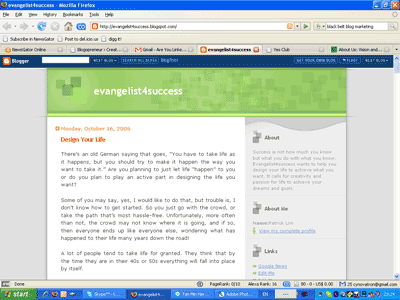
Here was his blog before:

Patrick's Blog

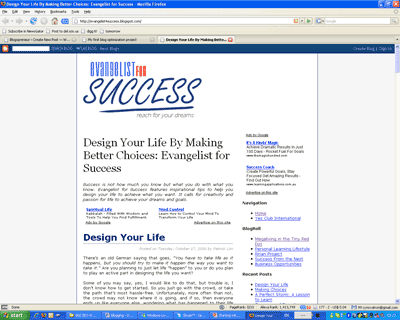
… and here is his blog now.

Evangelist for Success

So as you can see, over these few weeks, I basically got the blog template revamped and optimized. I mentioned it earlier here on this blog that I wasn’t very familiar with Blogger templates, because I was working with WordPress all the while. This project gave me the opportunity to look back and restart from the basics.

While the new Blogger allows us to use the drag and drop, widget-style template, I reverted back to the old HTML, just using the classic style templates. I think widgets are great for quick editing of templates, but when it comes to optimization for search engines, we really need to know what is the underlying code that these widgets produce. If you are familiar with the widgets and how to control them, its great, but for myself, I really prefer more control over the HTML codes and exactly what code is shown behind the scenes.

Since I’ve taken time to look at the template tags for Blogger, I guess it would be good if I can share with the rest of you.

Let’s start by talking about about SEO for blogs.

SEO for Blogs

Most SEO practitioners would understand that a well optimized site requires a lot of attention to be paid to the underlying HTML of every page. This means that in order for you to build a well optimized static HTML site (i.e. no database queries and stuff like that), the optimization process will require that every page be looked into, so that the very key items like the page title, and meta tags are changed accordingly for each page, so that the search engine bots will be able to easily tell the difference between pages.

This however, becomes a little challenging for blogs - because in a blog environment you cannot edit just one post (well, you can do that in WordPress, but not for Blogger, as far as I know it). The WordPress template system runs on a hierarchy, making tweaking flexible, because you can easily use a different page for a category, or for a single post, or for a blog archive page. For the Blogger template, however, all you can do is to make changes to one template file. This means that that ONE file will need to cater for the different sections of the blog, whether you are viewing a permalink, or a category or the main page.

That is the challenge.

Fortunately, Blogger provides a couple of very nifty tags for you to customize this. The tags are:

  1. <MainPage>...</MainPage> - Anything that goes between these tags will be processed in the main blog page, so for example, if you are hosting with blogspot, code between these tags will be shown when you access http://yourblog.blogspot.com. In this page, the part between the tags <blogger> and </blogger> will be repeated many times, one for each post.
  2. <ArchivePage>...</ArchivePage> - HTML code that goes between these tags will be processed when the user surfs on to an archive page. So for example, if the user surfs on to the January 2005 archives, the code betweent these tags will be processed. Similar to the previous one, the part between <blogger> and </blogger> will be repeated once for each post
  3. <ItemPage>...</ItemPage> - Code between these two tags will be processed only when the reader surfs on to a permalink page - that is, a page that shows typically shows only one post, and then followed by a string of comments.

There is also a tag that goes <MainOrArchivePage>...</MainOrArchivePage> - and these are basically a combination of <MainPage>...</MainPage> and <ArchivePage>...</ArchivePage>.

So what, when you have these tags?

I guess that is the question on your mind right now. Well so what? How do I apply that to tweak the design?

Let me give an example as to how you can use these three tags for work on SEO. Remember every page needs to have a different title? If you look at any typical template, what you will see in the in the head section of the HTML (where the title tag is), is something like this:

<title><$BlogPageTitle$></title>

What this generates, however, is not so SEO friendly, because the <$BlogPageTitle$> tag works in such a way that if you are displaying your your blog main page, it displays the blog title, and when you display your permalink, the title changes to something in the format [Blog Title] : [Post Title].

So if my blog name is “My Daily Thoughts”, and my post title is “I started Internet Marketing”, what I will see in the title when I surf on to the post page is “My Daily Thoughts : I started Internet Marketing”.

This is not good, because your keywords for the post are in the post title. You want to emphasise that to the search engine, and the best way to do that is to change it to the format [Post Title] : [Blog Title].

How do you do that?

Ah ha! :P That is when the tags come into good use. :mrgreen:

Let me first display what I would use. That single line previously, would be replaced by something like this:

<MainPage>
  <title><$BlogPageTitle$></title>
</MainPage>

<ArchivePage>
  <title><$BlogPageTitle$> Blog Archives</title>
</ArchivePage>

<ItemPage>
  <Blogger><BlogItemTitle><title>
    <$BlogItemTitle$> : <$BlogTitle$>
  </title></BlogItemTitle></Blogger>
</ItemPage>

Note what goes on now. I have used the three different tags to work on each individual type of page separately.

On the main page, I want to show only the blog title. So within the <MainPage>...</MainPage> tags, I will show only default <$BlogPageTitle$>.

On the archive page, I want to show something like “My Daily Thoughts Blog Archive”, so I appended the word “Blog Archive” to the back of the <$BlogPageTitle$> code.

Lastly on the item page, I want to show something like “I started Internet Marketing : My Daily Thoughts”, so what I did was I had to extract out the item title from the post, which will come in the form of this:

<Blogger><BlogItemTitle><title>
  <$BlogItemTitle$> : <$BlogTitle$>
</title></BlogItemTitle></Blogger>

So, with the use of these three tags, I now have more control over what exactly is being displayed on each page. This title example is just one part of the template which I tweaked. Using the same principles, I made changes to the way how things are displayed for the main page, archive page and the item page, to make sure the important titles and keywords are highlighted to the search engines with header tags like <h1>...</h1>.

Of course, optimizing the template is just one part of the whole blog marketing process. After that, it is really up to the blogger himself to keep writing good articles, and go around leaving links to his blogs through comments, articles, forums and whatever means (minus spam! :mrgreen:) to get his blog up the listings of Google.

Do you have a Blogger blog? Have you optimized your template yet?

Technorati Tags: article marketing, blog marketing, blog optimization, blog template, blogger template, search engine optimization, seo

Bookmarks Explosion for 15 January 2007

Published Monday, January 15th, 2007 Comments 1 Comment Author Kian Ann

Bookmarks ExplosionI was out of town for the past two days, and the Internet access was not too good. Although I could log in and reply to comments, and I had this post composed over the weekend (this was supposed to be up on Saturday), I was unable to post it! ;)

Anyway, here are some wonderful links I’ve gathered over last week. Enjoy.

  1. Do you know how secure your blog login password is? If your monthly paycheck depends on your blog, then the keys to your office is your blog password. Make sure it is secure. Go back to the chalkboard as Easton teaches you how.
  2. One of my 2007 resolutions is to reach out to change the world, but I’ve not started yet - and looks like someone is working faster than me. Let’s join forces, make 2007 THE year for us.
  3. Every newsletter has its different sections in every issue, and each section appeals to a different reader, so consider how you can model after successful magazines or newsletters, as Mike probes you for your blog’s editorial calendar.
  4. Copyblogger says that RSS technology is not only for you to keep track of each of the 2 million blogs you read everyday, but really about permission marketing.
  5. Ted doesn’t only want everybody to read his books, but also his blog - and he’s going to show you how he is going to make it happen!
  6. Tony has been sharing really really powerful insights at Problogger.net lately, and this especially is a must read - How to market your blog in 2007.
  7. How much can you rely on your Adsense? Can you guarantee that you will get your monthly paycheck… even if you follow the rules? Here’s one true story about never putting all your eggs in a single basket.

Technorati Tags: adsense, blog marketing, blogging strategy, bookmarks explosion, links