
I was just reading the post by Thord Hedengren from the Blog Herald, Docs & Spreadsheets as a blogging tool:
There’s another feature which I haven’t tried out yet. You can actually post your work to a blog by setting up some stuff in Docs & Spreadsheet settings. Blogger seems easy enough, and there are APIs ready for some other systems as well including Movable Type but not WordPress. Has anyone tried this to a greater extent?
So I just dived in and tried it out!
Well, I’d say still prefer my WordPress post admin screen maybe because of familiarity, and since Firefox 2 comes with a spell checker that makes everything wonderful… but the thing is… it works!
Here’s how you go about doing it.
1. Get started with Google Docs
Head on to Google Docs, and sign in with your Gmail account credentials.
2. Write your document
Google Docs has a nifty rich text editor just like what you get in Gmail, that allows you to do everything – change your font colors, hyperlink, font faces etc.

After you are done, just click save (on the right!)
3. Configure Blog Settings
This brings you to the publish page… edit your blog settings.
You will see this page!
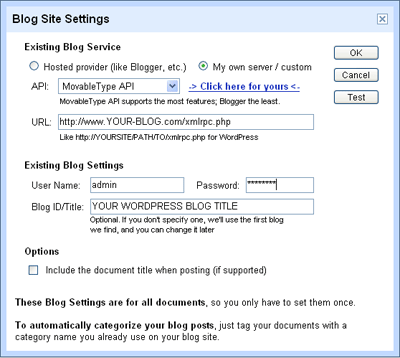
Now, if your blog is hosted on Blogger.com, WordPress.com, LiveJournal.com or any of those listed in the drop down box, than all you have to do is to select your platform and key in your blog login credentials.
If yours is hosted by yourself, and you need to know your blog API, and the URL to publish to. You can click the -> Click here for yours < - to find out common Blog APIs and URLs. For WordPress, choose the Movable Type API, and your URL will be http://YOURBLOG/PATH/TO/xmlrpc.php
So key in those stuff, and your login credentials for your blog. Click on test to make sure everything works fine, and you are done!
4. Publish!
Now, for every document you write, all you have to do to post to your blog is to get to the publish page, and click “Post to Blog!”
For me, somehow the phrase “This document has not been published to your blog.” somehow just doesn’t change, even after I have published the post. I wonder why, but just be mindful about that. If not you will end up with multiple posts!
Also, I realised that this is not very nice if you had multiple blogs to post to. Google Docs only allows one blog configuration setting. Note also that you cannot remove the configuration setting once you have configured one!
While Google Doc works to publish a post, I really don’t find it as intuitive and friendly as the native admin screen for each blogging engine. It also doesn’t allow you to add other blog specific things like custom fields, change the post timestamp and stuff like that.
So I’m sticking to my WordPress admin screen. I love it!
Pingback: Tech Tag »
Whenever I try to set up Google Docs for publish on my wordpress I get an error!
Hey Passegua, what error did you get?
I have a WordPress site that is hosted elsewhere, but I’m not sure exactly what to enter when it says “http://YOURBLOG/PATH/TO/xmlrpc.php.” I assume “YOURBLOG” should be “www.myblog.com”, but what does “PATH/TO/” represent? Can you help?
Thanks!
Hi Lisa,
In your WordPress files, (in the folder where wp-config.php is located) there is a file xmlrpc.php. This path you specify in Google Docs should point to that file. 🙂
My error is (more or less, i quote on memory)
“an error occured, it will be fixed immediately”
I checked many times all the settings, no way!
thanks
Oh no Passegua, the error description isn’t descriptive enough for me to be able to help… maybe you could email the peeps in Google or try the Google Docs and Spreadsheets help group?
Ok, I quote exactly what I get:
“there is an error we’ll fix it immediately!”
You may read the same issue on google support forum
My blog settings are:
http://lnx.sinapsi.org/wordpress/xmlrpc.php
and the error is: “there is an error we’ll fix it immediately!”
Thanks.
Hey there,
Have you tried posting to other blogs? Perhaps you could test the same settings on another WordPress blog and then you can isolate if the problem is in the WordPress end or the Google Docs side?
No, I didn’t try posting to another blog.
thanks
I have been using Google Docs and it works well. However I have another user on my blog that can post, but he gets an error whenever he tries. Anyone else tried with multiple authors posting to wordpress.com?
Pingback: Gardener.se » Blogga med hjälp av Google Docs.
Pingback: Blogging with Google Docs - Blog of Leonid Mamchenkov
I’m trying to find configuration page from your step 3. Thanks for your help,
Armin
Pingback: | Greywulf's Lair
Pingback: 从Google Docså‘布到Wordpress | Think Louder - 大声想
Pingback: links for 2008-12-30 |
has anyone got experiences with publishing google tables to a wordpress page? unfortunatelly, i’m not a programmer. it seems to work, but how do i get rid of the table heades and have access to the cells?
Can you post to multiple blogs all at once and also select which blogs of yours you want to post to
Hey John,
I think as of now, it should only be able to post to one blog at a time. Also, you just need to specify to a different xmlrpc to post it to a different blog isn’t it?
Pingback: Learning Aloud -
Pingback: Blog Posts From Google Docs | Mr. Loftus' Blog for Teachers
Hey folks,
am I blind ? I can´t find the settings in Google Docs where I can set up my the API for my blog.
Helpppppp !!!
Thx !