
I once attended an SEO Workshop by the Singapore SEO Expert, and the trainer related to me that it is important to have a different meta description and meta keywords tag for each page of a website you are building.
Since I was working primarily on blogs, I was kind of disappointed because I thought blogs all use the same template, and most of them provided for only a different post title and content for each different post.
I particularly love working with WordPress (I’m a control freak when it comes to websites!) and I was investigating this issue further yesterday in the WordPress Codex, and I found a solution – and one that does not even require an extra plug-in! Custom Fields!
How do you get started?
First, you have to add some custom fields to your post. This is done when you are composing your post in the admin panel. There is a section under the main post called custom fields. Use that section to add the two meta tags in – description and keywords. And don’t limit yourself to description and keywords – you could have anything else! Author description, What I am doing, Weather, Mood etc.
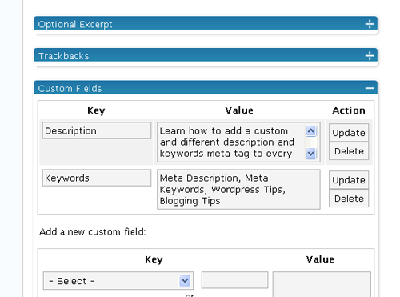
Next, you have to edit your WordPress blog template.
In the template’s single.php file, add these two lines inside your HTML head.
<meta name="Description"

content="<?php echo(get_post_meta($post->ID, "Description", true)); ?>">

<meta name="Keywords"

content="<?php echo(get_post_meta($post->ID, "Keywords", true)); ?>">
Then, you are done! The get_post_meta() function retrieves the custom fields according to what you keyed in.
For more information on the WordPress meta functions and custom fields, check out Using Custom Fields in the WordPress Codex.
Hi,
Is it possible on blogspot too?
Hi Rupesh,
Unfortunately, I don’t think this feature is available on blogspot – blogger blogs use only one template, and there are no custom fields.
Check out http://labnol.blogspot.com for the main site and an individual page. But, I am sure he will not share this SEO secret.
Hey Rupesh,
That can be done in blogger – he put his blog post title (combined with his own set of static keywords for the whole blog) in his meta keywords! 😉
Pingback: Desktop blog editors? Why not use WordPress?
Pingback: SEO Blogging « TopSearchRanking
Pingback: Reoptimizing Blogopreneur - Blogopreneur.com
i have put this code on my site but this is not working fine some time keywords comes but description is not coming can u tell me in detail m i wrong some where
How does or will this compromise with my index page’s title, keywords, description? Thank you 🙂
I’m sorry to forget to mention that the original php file does not include the description and keywords and so I have added them manually in the header.php using the standard html code.
fantastic. Its worling fine in http://www.tutorialwebdesign.com. Now I can easly describe different keywords and description for each post.
thanks
http://www.tutorialwebdesign.com
an online magazine to web design
I did this..
description is coming..but keywords are not coming..
plz suggest what to do.
http://tutorialwebdesign.com/2008/09/7-benefits-of-social-bookmarking/
thanks
http://www.tutorialwebdesign.com
Wow , very nice post , thx for sharing this great info
Pingback: Blog Cleanup Episode 1: Tags – Out! - Blogopreneur.com
I just click on my browser drop down link, then click source and saw my descriptions and keywords on my post page. You describe the tutorial so easy a caveman can do it. Sorry if I offended any caveman. I’m bookmarking this page. Thanks Tan Kian Ann.
Thanks for sharing this wonderfull trick..
Pingback: Wordpress Custom Fields for Keywords and Description Meta Tags | RealShared.com
an u please tell me, how to display limited characters for ‘description’ custom field..where can i define in code for limited characters…
content=”ID, “Description”, true)); ?>”>